

Skip to content
← ALL SOLUTIONS
FirePRINTDICOM PRINT · SCP

FirePRINT

One DICOM Print SCP. Any CUPS printer.

Receive DICOM Print jobs from any connected and authorized modality, render them as PDF with patient header and route to any standard CUPS printer — no proprietary film printer required.

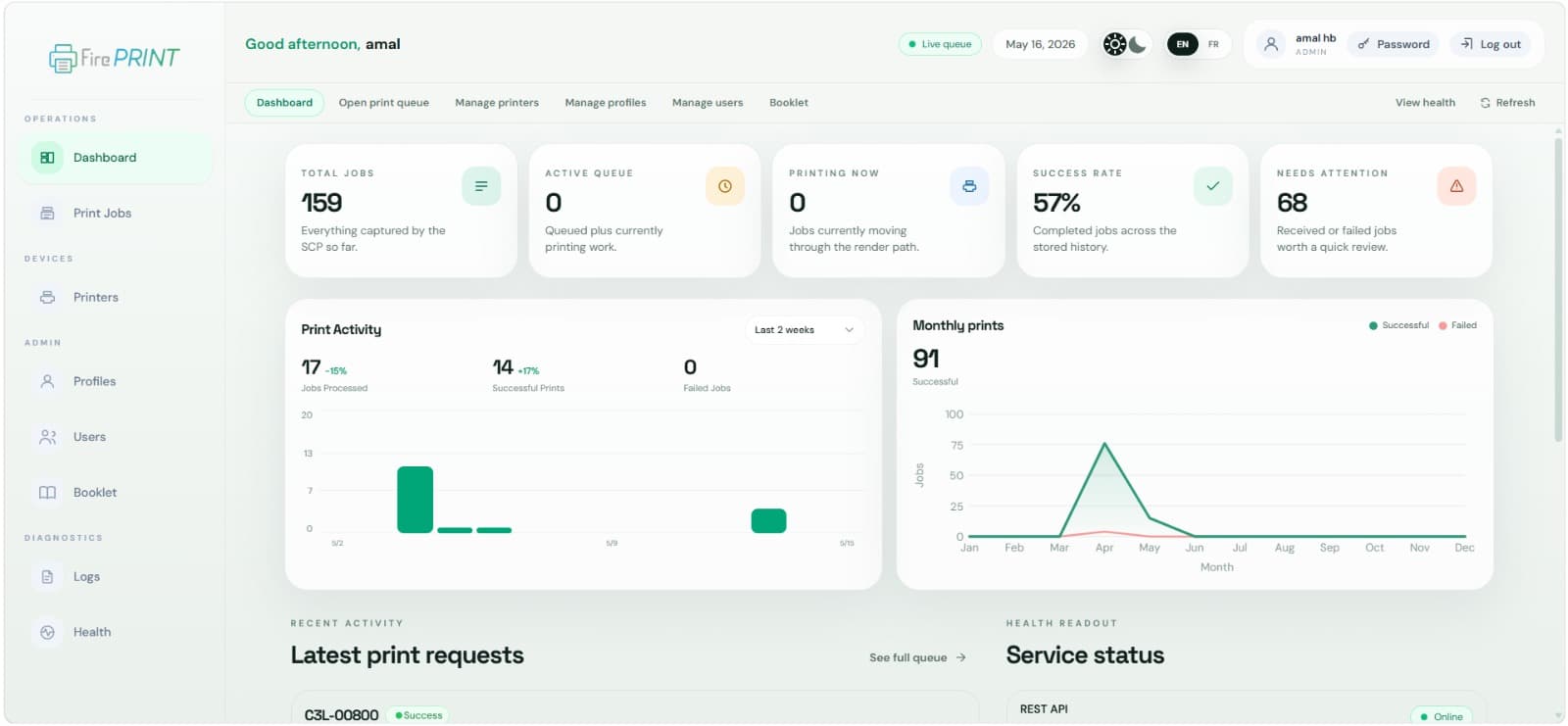
FirePRINT · operations dashboard
SCP
DICOM PRINT
CUPS
PRINTER ROUTING
14
PERMISSIONS

KEY FEATURES

DICOM Print SCP

Standards-compliant Print SCP. Configurable AE Title, calling-AET whitelist and timeout — reconfigurable live from the UI.

DICOM → PDF pipeline

Per-job windowing, FilmBox-aware layout and patient header inserted from DICOM tags. Optional Tesseract OCR for burned-in patient text.

RBAC & granular profiles

Admin and secretary system roles plus custom profiles with 14 fine-grained permissions and per-user overrides.

PDF archive & reprint

Every job is stored alongside its source DICOM. Reprint, delete, or compose several jobs into a single grid PDF.

Real-time supervision

Live job queue with HIGH/MED/LOW priorities, date filtering and per-job actions from a React dashboard.

Hot reconfiguration & health

Restart the SCP without restarting the API. Built-in health page covers API, database and DICOM SCP status.

WORKFLOW

01

Connected modality sends Print

02

SCP receives & persists

03

DICOM → PDF conversion

04

Queue & compose

05

CUPS prints

06

Archive & audit

INTEGRATES WITH

The FireThunder ecosystem.

FirePRINT works standalone or as part of the full suite. One patient database, one admin interface.

FirePACS FireVIEW FireRIS
PERSONALIZED DEMO · 30 MIN

See FirePRINT in your center.

An expert calls you, understands your activity, and presents the right solution for your center.

Book a slot

ALSO EXPLORE

FireRIS
RIS · CORE
FirePACS
PACS · ARCHIVING
FireVIEW
VIEWER · ISO 13485
DICOM PRINT · SCPSOLUTION

FirePRINT

One DICOM Print SCP. Any CUPS printer.

Receive DICOM Print jobs from any connected and authorized modality, render them as PDF with patient header and route to any standard CUPS printer — no proprietary film printer required.

SCP
DICOM PRINT
CUPS
PRINTER ROUTING
14
PERMISSIONS
FirePRINT · operations dashboard
FEATURES

Everything FirePRINT brings to your center.

DICOM Print SCP

Standards-compliant Print SCP. Configurable AE Title, calling-AET whitelist and timeout — reconfigurable live from the UI.

DICOM → PDF pipeline

Per-job windowing, FilmBox-aware layout and patient header inserted from DICOM tags. Optional Tesseract OCR for burned-in patient text.

RBAC & granular profiles

Admin and secretary system roles plus custom profiles with 14 fine-grained permissions and per-user overrides.

PDF archive & reprint

Every job is stored alongside its source DICOM. Reprint, delete, or compose several jobs into a single grid PDF.

Real-time supervision

Live job queue with HIGH/MED/LOW priorities, date filtering and per-job actions from a React dashboard.

Hot reconfiguration & health

Restart the SCP without restarting the API. Built-in health page covers API, database and DICOM SCP status.

IN ACTION

Production interface screenshots.

FirePRINT · operations dashboard
WORKFLOW

The typical journey with FirePRINT.

1
Connected modality sends Print
2
SCP receives & persists
3
DICOM → PDF conversion
4
Queue & compose
5
CUPS prints
6
Archive & audit
NATIVE INTEGRATIONS

FirePRINT natively talks to the other FireThunder modules.

No third-party connectors, no extra licenses. Everything works out of the box.

FirePACS
FireVIEW
FireRIS
FIREPRINT IN ACTION

See FirePRINT tailored to your center.

Free personalized demo · Reply within 24h · In Morocco, by phone or on-site.

Book my demo →Contact an expert